Subscription Renewal Premium
SUBSCRIPTION RENEWAL PREMIUM BY STOREPRO
Subscriptions Renewal Reminders allows you to send your subscribers a Renewal notification by Emails X days before their subscription ends
24 X 7 Support
99% Customer Satisfaction Rating
Plugin Version
Downloads
Last Updated
Subscriptions Renewal Reminders Plugin for WooCommerce Subscriptions
To meet the new US Federal Trade Commission (FTC), we have added a Click to Cancel option on the subscription reminder emails. You may use your preferred custom text on the button.
Are you ready to take your subscription management to the next level? Say goodbye to missed renewals and hello to Store Pro, seamless subscriptions! With our Subscriptions Renewal, you’ll never miss a beat. This powerful tool allows you to effortlessly send eye-catching renewal notifications to your subscribers X days before their subscription ends. Picture this: a perfectly timed email, landing right in your customers’ inboxes, enticing them to renew their subscription without a second thought!
Type of Subscription
The ability to choose the type of subscription period renewal reminder emails are sent to.
Renewal Periods
Renewal period can be chosen from the available options which is daily, weekly, monthly or yearly.
Updating Fields
The ability to change the from email address and senders name for renewal reminder emails.
Shortcodes
Additional shortcodes are included for email templates, such as the total amount, subscription link, and my account link.
Manual Payment Reminder
Automatically send renewal reminders for subscriptions using manual payment methods. It helps ensure customers are notified on time to avoid missed renewals.
Filters Additional
Filters that allow you to expand the plugin's functionality and customize email templates. You can also use these filters to modify the subscription period.
Admin Email
Send automated renewal reminder emails to admin and personalize the admin email template.
Test Email
An email test feature has been included.
Multi-Interval Reminders
Our plugin lets you send multiple reminders — for example, 14 days and 3 days before renewal — giving you more opportunities to engage with subscribers and reduce unexpected cancellations.
Admin CC Options
Our plugin introduces CC options, enabling you to send automatic copies of every renewal reminder to selected admin email addresses.
Customizable Email Templates
Our plugin includes a built-in WYSIWYG editor that lets you create branded, visually engaging renewal reminders. Add text, images, links, and shortcodes to reflect your brand’s personality and tone.
Click-to-Cancel Button (FTC Compliance)
Our plugin adds a “Cancel Subscription” button directly in the renewal reminder email, helping your store comply with FTC transparency and cancellation requirements.
How Our Plugin Differs from WooCommerce Subscription Core Renewal Notices
While WooCommerce core provides a basic renewal email system, Subscription Renewal Reminders for WooCommerce extends it with powerful customization, scheduling, and compliance features designed for real-world subscription management.
Features
Continuous Updated & Upgrades
Experience Seamless Progress: Our WooCommerce Subscription Renewal Plugin offers Continuous Updates & Upgrades as a standout feature. Stay ahead with the latest enhancements effortlessly.
Enhanced Customization
Tailored Subscription Renewal: Unlock the power of enhanced customization with our WooCommerce plugin for subscription renewals, allowing you to personalize your experience to your liking.
View Detailed History, Debug Logs, and Cron Schedules
Success/Failure processes are keenly recorded and viewed from the History section. Debug logs are included for identifying and resolving issues easily.
Dedicated Support
Comprehensive Subscription Renewal WooCommerce Plugin with Dedicated Support and More.
Compatibility with Multiple Third-party Plugins
Subscriptions Renewal Reminders plugin is compatible with third-party plugins and themes.
Intuitive Renewal Reminders
Streamlined Subscription Renewal Reminders: Simplify the renewal process with intuitive notifications.
Subscriptions Renewal Reminders Plugin for WooCommerce Subscriptions
99% Satisfaction Rating
We make every effort to make sure our customers are happy.
Average 4.6 out of 5 Stars Rating
Our plugins are highly regarded in WordPress forums and review platforms.
100% Money-Back Guarantee
Our 30-day No-Risk Money Back Policy assures 100% money back.
Trusted by from 100+ Countries


Configuring Your Plugin Settings
Download and Activate Your Ultimate Experience!
Once downloaded, activate the plugin and then navigate to the plugin settings.
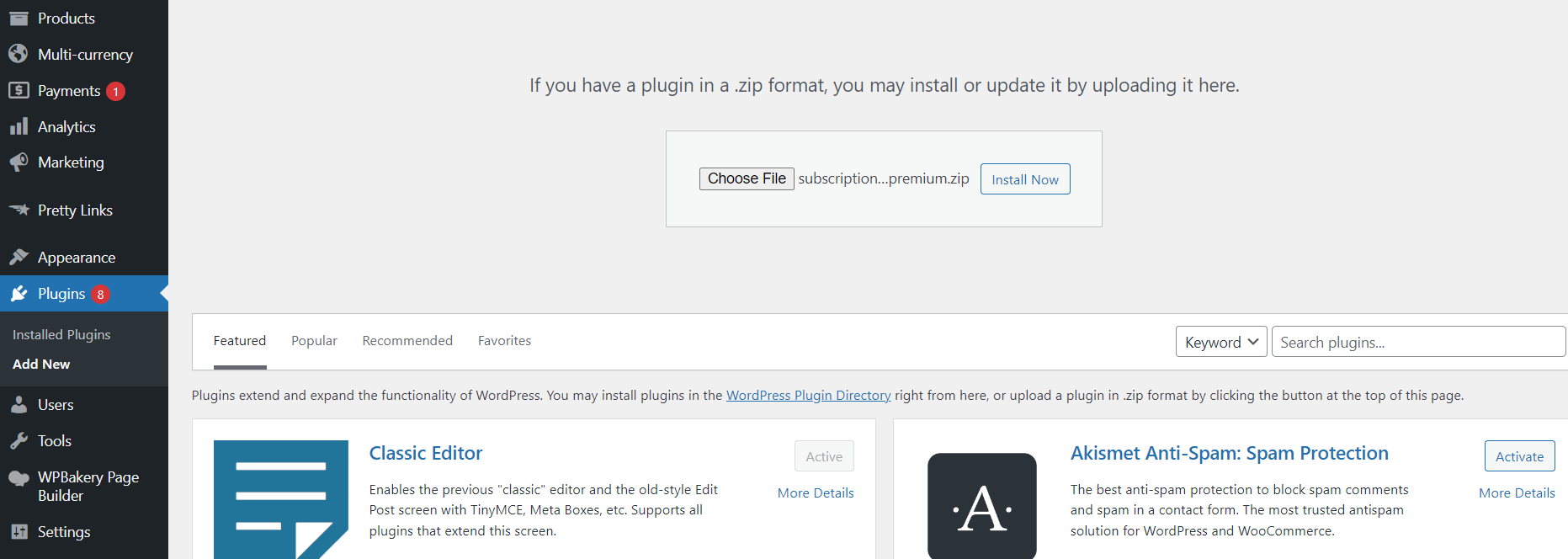

Add your license key to activate the renewal reminders for the first time.
License Key Activation Made Easy
Add your license key to activate the renewal reminders for the first time.
Streamline Your Subscription Data Sync for Seamless Management
Synchronize subscription data to Renewal Reminders Plugin for the first time !


Wrapping Up Your Plugin Settings
This “Subscriptions Renewal Reminders” settings page is for the final configuration. The main “Enable Renewal Notification Emails” switch activates or deactivates all reminders. You can select which subscription periods, such as “Monthly,” should trigger emails. The “Reminder Intervals” section lets you set multiple reminders, like 7 days before renewal. The image shows a second reminder scheduled for 2 days before renewal. This premium feature helps you “wrap up” your settings to ensure functionality. You can set the precise “Time for Sending Renewal Notification (in UTC).” In the image, this is set to 00:00 UTC (midnight). There is a specific toggle to “Enable renewal reminder email for manual payment subscriptions.” A final “Enable Debug Logging” option is available for troubleshooting purposes.
Unlock full functionality: Configure your email settings
This “Email Settings” tab provides deep customization for reminder communications, divided into sections for both customer-facing emails and internal admin alerts. The first part, “Renewal Email Customization,” defines the sender’s identity. You can set the “Renewal Reminder Sender Name” and “Renewal Reminder From Address” to ensure customers recognize your brand. You can also write a custom “Email Heading” and “Email Subject” for the reminder. A rich-text editor is available to craft the main “Email Content” body, which allows you to use “Available Shortcodes” to insert dynamic data like {first_name} or {next_payment_date} that are automatically populated.
A separate “Admin Email Settings” section lets you configure a unique internal alert. This notification is sent only to a specified admin email address and has its own subject, heading, and content, separate from the customer’s email. Finally, general settings at the bottom control the overall “Email Type,” such as HTML. A key feature here is the ability to “Enable Click To Cancel Button,” which inserts a cancellation link directly into the customer’s email for convenience.

Technical Info
Last Updated 24 Oct 2025
1.2.0
You may also like these plugins
Buy x Get y Free Plugin for WooCommerce
Are you looking to add some promotional products to your cart with a buy one get one free plugin for WooCommerce? Here you go! The Buy X Get Y by StorePro allows you to achieve your goal. You can automatically add the desired free product to the customers cart along with the main product with the help of simply arranged plugin settings.
ProSeller AI – WooCommerce Product Content Generator
Looking to enhance your WooCommerce store with high-quality product content effortlessly? The Proseller AI woocommerce product content generator by StorePro has you covered! Instantly generate multiple product titles, descriptions, and short descriptions, no API key required. You can even run built-in A/B tests to find the highest-converting version. It’s a smart, seamless way to boost your store’s content and performance.
Subscription Renewal Reminders
Want to make sure your customers never miss a subscription renewal? This free plugin has you covered! The WooCommerce Subscription Renewal Reminder plugin sends automated email alerts before a subscription ends. It’s simple, effective, and helps you reduce churn while keeping your users informed with minimal effort.
Frequently Asked Questions
What should I do if the renewal reminder is not sending reminders?
1.Check Email Service: Verify that your website’s email service is functioning correctly. Ensure that your email settings are configured properly, and test sending a regular email from your website to confirm that the email service is operational.
2.Enable Cron Job: Make sure that the Cron job is enabled on the server side. Additionally, check the wp-config.php file to ensure that the Cron is not set to “false.” A functioning Cron job is crucial for scheduled tasks, including the automatic sending of reminders.
3.Manually Sync Subscriptions: In the renewal reminder plugin settings, there is usually an option to manually sync subscriptions. Try triggering the synchronization manually to ensure that the plugin is fetching the latest subscription data.
4.Check WP Mail Log: Enable the WP Mail log to monitor outgoing emails from your website. This log will help you determine if the renewal reminders are being sent or if there are any errors in the process.
5.Enable Debug Log: Enable the debug log from the plugin settings. This log will provide valuable information about any issues or errors occurring within the plugin. If you encounter difficulties, share the debug log with our support team by emailing us at [email protected]. If you have completed these steps and are still encountering issues with the renewal reminder plugin, please reach out to our support team at [email protected]. Our team will investigate the problem from our side and provide further assistance.
Can I modify email contents of the Renewal Reminders plugin to suit my preferences?
1.Access Theme Functions or Create a Custom Plugin: First, access your theme’s functions.php file or create a custom plugin where you can add the filter functions.
2.Use Filter Functions: Add the following filter functions to your theme’s functions.php file or custom plugin:
a. add_filter('sp_head_content_filter', 'my_custom_head_content_filter', 10, 3);
b. add_filter('sp_body_content_top_filter', 'my_custom_body_content_top_filter', 10, 3);
c. add_filter('sp_body_content_inner_filter', 'my_custom_body_content_inner_filter', 10, 3);
d. add_filter('sp_body_content_bottom_filter', 'my_custom_body_content_bottom_filter', 10, 3);
3. Customize Email Contents: Now, you can define your custom functions to modify specific parts of the email content using the filter functions. The filter functions mentioned above provide different entry points where you can customize the email content:
sp_head_content_filter Customize the content for the email’s head section.
sp_body_content_top_filter Customize the content for the email’s top section.
sp_body_content_inner_filter Customize the main body content of the email.
sp_body_content_bottom_filterCustomize the content for the email’s bottom section. You can use these filter functions to add or remove content, change styling, or insert dynamic data into the email. The third parameter (usually $data) passed to the filter functions contains information about the email, allowing you to make dynamic modifications based on the specific email being sent. Please note that customization through filter functions requires some coding knowledge. If you encounter any challenges during the process, feel free to seek assistance from a developer or our support team.
Is there a way to preview the email templates before sending them through the Renewal Email plugin?
1.Access Email Settings: Firstly, access the settings section of the Renewal Email plugin within your WordPress dashboard.
2.Configure Test Email: In the email settings, locate the “Test” function or “Send Test Emails” option. It typically allows you to enter an email address in the “To” section.
3.Select Subscription: Next, choose a specific subscription or use a sample subscription from your Subscription forms. This will help you test the email template with real data.
4.Click “Send Test Emails”: After setting up the email address and selecting the subscription, click on the “Send Test Emails” button. The plugin will then generate a test email using the email template, and it will be sent to the specified email address.
5.Review the Email Content: Check your inbox for the test email. Open it to view the actual content of the email template. This will give you a preview of how the email will appear to recipients.
6.Make Additional Changes (if required): If you need to make further changes to the email template, you can go back to the email settings and customize the content based on your preferences. Using the “Test” function is a great way to ensure that your email templates are set up correctly and look professional before sending them to your subscribers. It allows you to verify the layout, styling, and dynamic data integration in the email, making it easier to fine-tune the templates as needed.
Can I modify the periods at which renewal reminders are sent for WooCommerce subscriptions?
1.Access Theme Functions or Create a Custom Plugin: To begin, access your theme’s functions.php file or create a custom plugin where you can add the filter function.
2.Add Filter Function: Add the following filter function to your theme’s functions.php file or custom plugin: function sprr_subscription_frequency_filter($frequency) { // You can modify the array of subscription frequencies here if needed // For example: return array(‘day’, ‘month’, ‘year’); return $frequency; } add_filter(‘sprr_subscription_frequency’, ‘sprr_subscription_frequency_filter’);
3.Customize Subscription Periods: Now, you can customize the subscription periods by modifying the array of subscription frequencies within the sprr_subscription_frequency_filter function. The filter function allows you to adjust the reminder periods based on your specific requirements.For example, if you want reminders to be sent every day, month, and year, you can modify the function like this: function sprr_subscription_frequency_filter($frequency) { return array(‘day’, ‘month’, ‘year’); } add_filter(‘sprr_subscription_frequency’, ‘sprr_subscription_frequency_filter’); Adjust the array elements as needed to set your preferred periods. Available options include ‘day’, ‘week’, ‘month’, ‘year’, and any other custom periods you may have defined.
4.Save Changes: After adding the filter function and customizing the subscription periods, save the changes to your theme’s functions.php file or custom plugin. By using the provided filter function, you have the flexibility to modify the renewal reminder periods for WooCommerce Subscriptions according to your business needs. This allows you to align the reminders with your subscription plans and customer preferences.